
Pull Integration
Pull Integration is used when your ERP should remain the source of truth and Jodo should fetch the latest student, fee, and schedule details only when required.
In this pattern, your ERP exposes a fetch-student API. Jodo calls this API during key moments in the payment or Flex lifecycle and uses the response to update the student context before continuing the flow.
When to Use Pull
Section titled “When to Use Pull”- Student and fee data changes frequently in your ERP.
- Jodo should always use the latest fee balance before reminders or debit presentation.
- Your team prefers not to push every data change to Jodo in real time.
- Your ERP can expose a highly available API that responds quickly.
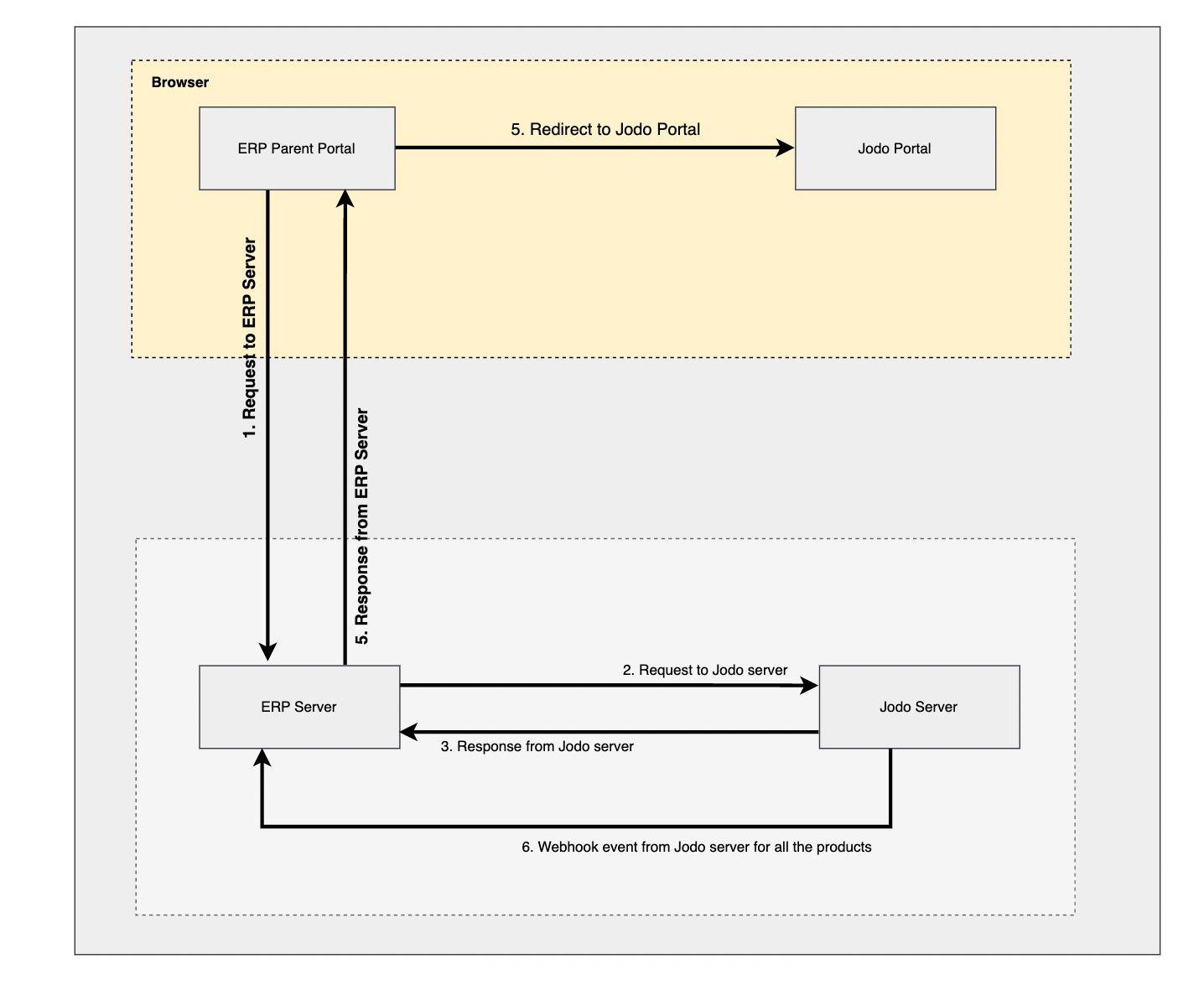
Jodo calls the configured ERP API in situations such as:
- Before Flex plan setup.
- Around 24 hours before an instalment presentation.
- Before payment reminders are sent.
If Jodo cannot fetch the required data while scheduling a debit, the instalment presentation may be skipped until the data issue is resolved.
API to Fetch Student Details
Section titled “API to Fetch Student Details”Requirements
Section titled “Requirements”- Protect the endpoint with authentication. Basic authentication is preferred unless another mechanism is agreed.
- Keep the endpoint highly available.
- Return a response within 15 seconds.
- Reflect fee changes, discounts, direct payments, and fee increases immediately in the response.
- Return clear error codes when the student cannot be used for collection.
Request
Section titled “Request”Jodo makes a HTTP GET request on configured URL. It automatically adds following query parameters depending on the lookup option configured for the institute.
| Query Parameter | Description |
|---|---|
| identifier | Unique identifier for the student. |
| grade | Grade code. |
| custom_identifier | Custom identifier for the student (if applicable). |
| collector_code | Branch code (if applicable). |
| academic_year_start | Academic year start (if applicable). |
| academic_year_end | Academic year end (if applicable). |
Sample Response (Success)
Section titled “Sample Response (Success)”Response from the ERP system in case the student is found successfully and is active.
Response HTTP code
Section titled “Response HTTP code”200Response Payload (without schedule)
Section titled “Response Payload (without schedule)”{ "status": "success", "data": { "student": { "fullname": "Student Name", "identifier": "UNIQUE_IDENTIFIER", "collector_code": "BRANCH_CODE", "grade": "GRADE_CODE", "new_admission": true, "academic_year_start": "2022", "academic_year_end": "2023", "date_of_birth": "2006-04-17", "primary_contact_name": "Primary contact name", "primary_contact_number": "Valid mobile number", "primary_contact_email": "Valid email address" }, "fee_components": [ { "component_type": "TUITION_FEE", "fee_amount": 10000 }, { "component_type": "TRANSPORT_FEE", "fee_amount": 10500 } ] }}Response Payload (with schedule, applicable where schedule is maintained in ERP)
Section titled “Response Payload (with schedule, applicable where schedule is maintained in ERP)”{ "status": "success", "data": { "student": { "fullname": "Student Name", "identifier": "UNIQUE_IDENTIFIER", "collector_code": "BRANCH_CODE", "grade": "GRADE_CODE", "new_admission": true, "academic_year_start": "2022", "academic_year_end": "2023", "date_of_birth": "2006-04-17", "primary_contact_name": "Primary contact name", "primary_contact_number": "Valid mobile number", "primary_contact_email": "Valid email address" }, "fee_components": [ { "component_type": "TUITION_FEE", "fee_amount": 10000 } ], "payment_schedule": [ { "due_date": "2023-07-17", "reference_id": "ref_1", "details": [ { "component_type": "TUITION_FEE", "amount": 5000 } ] }, { "due_date": "2023-09-17", "reference_id": "ref_2", "details": [ { "component_type": "TUITION_FEE", "amount": 5000 } ] } ] }}data.student (object, required)
| Attribute | Type | Required | Description |
|---|---|---|---|
| data.student.fullname | string | Yes | Full name of the student |
| data.student.collector_code | string | No | In case institute has multiple branch, this will be required |
| data.student.identifier | string | Yes | Unique identifier, this should be unique for the grade and academic year |
| data.student.grade | string | Yes | Grade code |
| data.student.new_admission | boolean | Yes | True if new admission else false |
| data.student.academic_year_start | string | Yes | Academic year start |
| data.student.academic_year_end | string | Yes | Academic year end |
| data.student.date_of_birth | string | No | Date of birth of the student in YYYY-MM-DD format |
| data.student.primary_contact_name | string | Yes | Primary contact name |
| data.student.primary_contact_email | string | Yes | Primary contact email |
| data.student.primary_contact_number | string | Yes | Primary contact phone |
data.fee_components (array of objects, required)
| Attribute | Type | Required | Description |
|---|---|---|---|
| data.fee_components[].component_type | string | Yes | Component type |
| data.fee_components[].fee_amount | number | Yes | Total component amount |
| data.payment_schedule | array | No | Required only if custom schedule configuration is enabled |
| data.payment_schedule[].due_date | string | Yes | Due date of the instalment |
| data.payment_schedule[].reference_id | string | No | Optional reference id for the instalment |
| data.payment_schedule[].identifier | string | No | Optional identifier for the instalment |
| data.payment_schedule[].is_downpayment | boolean | No | If the instalment is downpayment |
| data.payment_schedule[].details | array | Yes | Details of the instalment |
| data.payment_schedule[].details[].component_type | string | Yes | Component type |
| data.payment_schedule[].details[].amount | number | Yes | Payable amount |
data.user (object, optional)
Required only if the student is being pushed using the redirect from the ERP system (using init API).
| Attribute | Type | Required | Description |
|---|---|---|---|
| data.user.name | string | Yes | Name of the applicant |
| data.user.phone | string | Yes | Phone number of the applicant |
Sample Response (Error)
Section titled “Sample Response (Error)”Response from the ERP system in case of any validation error.
Response HTTP code
Section titled “Response HTTP code”422Response Payload
Section titled “Response Payload”{ "status": "error", "message": "<User friendly error message that can be shown to the users>", "code": "FETCH_ERROR_CODE"}Fetch Error Code
Section titled “Fetch Error Code”If ERP is unable to return student data for some reason, it can return error code. When the presentation takes place on a given due date, using this Jodo can identify the action to take. For example — if the student is discontinued or is not active.
| Error Code | Description |
|---|---|
| student_not_found | When student not found |
| student_discontinued | When student is inactive |
| student_transferred | When student has taken transfer to another branch |
| data_error | In case of any validation error or data inconsistency |